Digital Marketing
Crafting Powerful Ads: A Simple Guide to Building an Effective PPC Campaign in 2024
Published
2 years agoon
By
admin
Introduction
In the rapidly evolving world of online marketing, Pay-Per-Click (PPC) advertising has become a linchpin for businesses aiming to thrive in 2024. Picture this: a way to reach potential customers directly and pay only when they click on your ad. That’s the power of PPC. Crafting compelling ads isn’t just a fancy option; it’s the cornerstone of a successful campaign. In this guide, we’ll unravel the dynamics of PPC advertising with the opinions of experts from the top PPC management agencies in 2024, offering insights to help you navigate this ever-shifting landscape.
Social media platforms are not just for staying connected; they’re goldmines for advertisers. With users spending an average of two hours daily on platforms like Facebook, Instagram, and Twitter, these channels offer an unparalleled opportunity to showcase your products or services.
Understanding the Current PPC Landscape
Let’s start with the now. PPC isn’t what it used to be. Recent trends are shaking things up, and it’s crucial to keep up. Take Google Ads, Bing Ads, and social media platforms – they’re not just chilling; they’re constantly evolving. It’s not just about picking the right keywords anymore; it’s about riding the wave of emerging technologies.
Here’s a nugget for you: AI is in the driver’s seat. Algorithms powered by artificial intelligence are like your personal marketing Jedi, predicting user behavior and making your ad targeting sharper than ever. It’s not about spending money on every keyword but strategically choosing the ones that’ll bring in the clicks that matter. With the help of a PPC management agency at your fingertips, you can customize your marketing campaigns like never before.
Conducting In-Depth Keyword Research
You wouldn’t build a house without a solid foundation, right? The same goes for your PPC campaign. Keyword research is where it all starts. It’s about figuring out what words your potential customers are typing into that search bar. Get this right, and you’re halfway to victory.
Utilizing Advanced Tools
Gone are the days of manual keyword digging. Now, we’ve got some nifty tools at our disposal. Ever heard of Google Keyword Planner? It’s like a treasure chest full of insights. Type in a few words, and it’ll shower you with keyword suggestions, search volumes, and competition levels. And hey, it’s free!
Long-Tail Keywords: The Targeting Magic
Ever heard the saying, “It’s not about the quantity, it’s about the quality”? That’s the mantra for long-tail keywords. These are more specific phrases that might not get as many searches, but when they do, they’re from folks who know exactly what they want. Think of them as your golden tickets to reaching the right audience without shouting in the crowd.
Staying Updated with Industry Keywords
Here’s a nugget for you: industries change, and so do keywords. It’s like keeping up with the latest slang – you gotta stay in the loop. Regularly update your keyword list with terms trending in your industry. Google Trends is a handy tool for this, giving you the pulse of what’s hot and what’s not.
Crafting Compelling Ad Copy
First impressions matter, especially in the world of PPC. Your headline is the first thing folks see, so make it pop. Think about what would make you click. Is it a discount, a solution to a problem, or a curiosity-inducing question? Whatever it is, slap it in your headline.
Incorporating Persuasive Language
Now, let’s get persuasive. Your ad description is where you convince people that your product or service is exactly what they need. Use words that resonate – think “exclusive,” “limited-time,” or “must-have.” Paint a picture of how your offering can make their lives better.
A/B Testing for Optimal Performance
Imagine this: You write two versions of your ad, and the audience decides which one’s the winner. That’s A/B testing. It’s like a mini-competition to see which ad performs better. Change up your headlines, tweak your descriptions, and let the data guide you to the winning formula.
Adapting to Evolving Consumer Behavior
Consumer behavior is like a river – it keeps flowing and changing course. In 2024, folks are expecting more personalized experiences. Tailor your ad copy to match what your audience is looking for. Stay relevant, stay relatable, and watch those clicks turn into conversions.
Leveraging Ad Extensions for Maximum Impact
Now, let’s talk about strategy. Site link extensions give you more real estate in the search results. Imagine having additional links below your main ad directing users to specific pages on your site. It’s like a shortcut to what they’re looking for. Callouts are your chance to shout about what makes your business special – free shipping, 24/7 support, you name it. Structured snippets? They let you showcase specific aspects of your products or services. The key here is relevance – make sure your extensions complement your ad.
Impact on CTR and Quality Scores:
Why bother with ad extensions? Well, they’re not just fancy decorations. They’re proven to boost click-through rates (CTR) and quality scores. Users love more information, and Google rewards you for providing it. It’s a win-win. CTR is like the applause your ad gets – the more, the better. Quality scores determine how well your ad ranks and good scores mean better visibility.
Designing Visually Appealing Display Ads
Keep it simple, but make it pop. Choose colors that resonate with your brand and are easy on the eyes. Fonts? Legible, please. And don’t shy away from white space – it’s like a visual breather for your audience. Oh, and make your call-to-action (CTA) crystal clear. Whether it’s “Shop Now” or “Learn More,” let users know what you want them to do.
Incorporating Multimedia Elements:
Text-only ads are so last season. Spice things up with multimedia elements. Add high-quality images or videos that tell your brand story. Show your product in action or share a behind-the-scenes glimpse. Multimedia not only engages users more effectively but also sets your ad apart in a sea of sameness.
Adapting Visuals to Platform-Specific Requirements:
Different platforms, different rules. Your visuals need to adapt. Whether you’re on Facebook, Instagram, or a display network, each platform has its own set of specifications. Pay attention to dimensions, file sizes, and resolution. Don’t be the ad that looks pixelated or awkwardly cropped.
Utilizing Analytics for Continuous Improvement
In the world of PPC, decisions should be backed by hard facts, not hunches. Data is your guiding star. It tells you what’s working, what’s not, and where your dollars are making the most impact. It’s not about gut feelings; it’s about making strategic moves based on real numbers.
Overview of Analytics Tools and Platforms:
Now, where do you get this data? Analytics tools are your go-to pals. Google Analytics, Google Ads, and other platforms offer a treasure trove of insights. Dive into click-through rates, conversion rates, and user behavior. These tools are your eyes and ears in the digital landscape.
Monitoring Key Performance Indicators (KPIs) and Adjusting Strategies:
KPIs are your compass. They guide you toward success. Track metrics like click-through rates, conversion rates, and cost per conversion. When you notice a hiccup, it’s not a setback – it’s a course correction opportunity. Adjust your strategy based on what the data whispers to you.
Continuous Optimization Based on Real-Time Campaign Performance:
The beauty of digital marketing lies in real-time insights. Don’t wait for quarterly reports; optimize as you go. If a particular ad isn’t performing, swap it out. If a certain keyword is shining, give it more spotlight. It’s about adapting on the fly and keeping your campaign ship sailing smoothly.
Staying Ahead with Emerging Trends
The only constant in digital marketing is change. Stay in the loop with the latest PPC trends. Attend webinars, read industry blogs, and keep an eye on updates from platforms like Google and Bing. Being in the know helps you pivot before others catch on.
Adapting Strategies to New Technologies:
AI and voice search are not just buzzwords; they’re the future. Imagine optimizing your PPC ads based on how users speak to their devices. It’s happening. Embrace these technologies; they’re the secret sauce to staying relevant. Your audience is evolving, and so should your strategies.
The Role of Machine Learning in Optimizing PPC Campaigns:
Machine learning isn’t here to replace you; it’s your AI sidekick. It crunches massive data sets to predict user behavior. Smart bidding strategies and dynamic ad creation – machine learning optimizes your campaign efficiency. It’s like having a data-savvy assistant working 24/7.
Future-Proofing Your PPC Efforts for Sustained Success:
In the fast-paced world of PPC, future-proofing is the name of the game. Anticipate trends, adapt quickly, and build campaigns with longevity. It’s not just about today’s success; it’s about setting the stage for sustained triumphs.
Key Takeaways
Let’s wrap this up with some golden nuggets to power your PPC journey:
- Data is Your North Star: Let it guide your decisions.
- Analytics Tools are Your Allies: Use them wisely.
- Stay Nimble: Adapt based on real-time performance.
- Embrace Emerging Trends: AI and voice search are your allies.
- Future-Proof Your Strategies: Think long term.
Remember, a proactive approach is your secret sauce in the dynamic world of online advertising. Happy PPC campaigning, and may your clicks be ever in your favor!
You may like
Digital Marketing
Minishortner.com What Is Site Map for SEO? A Detailed Explanation for Website Owners
Published
2 months agoon
December 3, 2025By
admin
Search engine optimization (SEO) continues to evolve every year, but one element remains consistently important: sitemaps. Whether you run a personal blog, an eCommerce store, a corporate website, or a newly launched startup platform like Minishortner.com, understanding how sitemaps work can dramatically improve your website’s chances of ranking on Google and other search engines.
If you have ever wondered, “How do search engines understand my website structure?” or “How can I help Google discover all my pages quickly?”—the answer is simple: a sitemap.
In this comprehensive guide, we will unpack everything about sitemaps: what they are, why they are crucial, how they boost SEO, how to create one, how to submit it, and common mistakes to avoid. This long-form guide is designed for website owners, marketers, bloggers, developers, and especially beginners searching for a clear explanation of how sitemaps support SEO.
This guide will also discuss how modern platforms—such as URL shortener services, micro-sites, and content-based portals—benefit from sitemaps. If you are researching a topic like “Minishortner.com What Is Site Map for SEO”, this article will give you the full breakdown you need.
What Is a Sitemap?
A sitemap is a file—usually in XML format—that lists all important pages of your website. This file helps search engines like Google, Bing, and Yahoo understand your site structure and discover new or updated content faster.
Sitemaps act like a navigation map for search engine crawlers. Instead of trying to figure out your website on their own, crawlers use your sitemap to identify:
-
Which pages exist
-
Which ones are most important
-
When they were last updated
-
How often they change
-
How pages are linked
In short, a sitemap ensures that search engines never miss important content on your website.
Why Sitemaps Are Crucial for SEO
Sitemaps directly improve SEO by helping search engines:
✔ Discover Pages Faster
If your website is new or has low domain authority, search engines may not frequently crawl it. A sitemap ensures Google knows exactly where all your pages are located.
✔ Index More Pages
Without a sitemap, some of your pages may never be indexed, which means they will never appear in search results. A sitemap boosts the chances of indexing every important page.
✔ Understand Website Structure
This is especially helpful for:
-
eCommerce sites with thousands of products
-
Blogs with hundreds of posts
-
Dynamic sites that generate new pages frequently
✔ Improve Crawl Efficiency
Search engines have limited crawl budgets. Sitemaps help guide crawlers to your priority pages.
✔ Highlight Important Updates
If you update content regularly, your sitemap can tell Google to re-crawl the updated pages sooner.
This is why SEO experts frequently mention the importance of tools like Google Search Console combined with accurate sitemaps.
Types of Sitemaps Explained
There are multiple types of sitemaps, each with different use cases. Understanding the differences helps in creating a well-organized sitemap strategy.
1. XML Sitemaps (Most Important for SEO)
XML sitemaps are designed for search engines. They contain URLs and metadata such as:
-
Last modified date
-
Priority
-
Change frequency
These are the most essential sitemaps for SEO.
2. HTML Sitemaps (For Users)
HTML sitemaps help human visitors navigate your website. They are typically displayed as a simple webpage listing all links.
3. Image Sitemaps
Used for websites relying heavily on image search traffic—like photography, ecommerce product listings, and design portfolios.
4. Video Sitemaps
Useful for websites where videos play a crucial role. Helps Google index video content and display rich results.
5. News Sitemaps
For news publishers who require rapid indexing in Google News.
6. RSS/Atom Sitemaps
Automatically updated feed-based sitemaps, often used for blogs with frequent new posts.
How Sitemaps Work Behind the Scenes
Search engines send out crawlers (bots) to scan your site. When these crawlers land on your domain, they look for your sitemap file, typically located at:
If found, they use the sitemap to:
-
Read each URL entry
-
Identify the last updated timestamps
-
Prioritize the crawling
-
Index the content if valuable
In a sense, the sitemap helps search engines use their crawl budget efficiently and discover deep pages that might not be linked well internally.
Do All Websites Need a Sitemap?
Google states that even though sitemaps are not mandatory, they are highly recommended for most websites.
You especially need a sitemap if your website:
-
Is new
-
Has fewer backlinks
-
Contains thousands of pages
-
Has poor internal linking
-
Uses multimedia content (videos, images, news)
-
Is dynamic (user-generated content)
-
Has multiple categories or subdomains
Even small websites benefit from sitemaps because they improve indexing speed and accuracy.
Benefits of Sitemaps for Small, Medium & Large Websites
Sitemaps offer different advantages depending on the size of the website.
For Small Websites
-
Quicker indexing
-
Ensures new pages aren’t missed
-
Boosts visibility for low-authority domains
For Medium Websites
-
Helps SEO when multiple categories or content sections exist
-
Improves crawl coverage
-
Ensures old/hidden pages remain discoverable
For Large Websites
-
Essential for ecommerce with thousands of product pages
-
Helps Google identify canonical URLs
-
Prevents crawl budget wastage
-
Supports multiple sitemap files through a sitemap index
Understanding XML Sitemap Structure (With Example)
A basic XML sitemap looks like this:
<?xml version="1.0" encoding="UTF-8"?><urlset xmlns="http://www.sitemaps.org/schemas/sitemap/0.9"> <url> <loc>https://yourwebsite.com/</loc> <lastmod>2025-01-10</lastmod> <changefreq>weekly</changefreq> <priority>1.0</priority> </url> <url> <loc>https://yourwebsite.com/blog</loc> <lastmod>2025-01-08</lastmod> <changefreq>daily</changefreq> <priority>0.8</priority> </url></urlset>
This tells Google:
-
Which URLs exist
-
When they were last updated
-
How important they are
How to Create a Sitemap
You have two main options: automated and manual creation.
Automated Methods (Recommended)
1. Using CMS Plugins
If you use WordPress:
-
Yoast SEO
-
Rank Math
-
All in One SEO
These plugins auto-generate sitemaps and update them automatically.
2. Using Online Sitemap Generators
Tools like:
-
XML-Sitemaps.com
-
Screaming Frog SEO Spider
-
Sitebulb
-
Ahrefs / SEMrush (advanced)
3. Server-Side Auto-Generated Sitemaps
Frameworks like Laravel, Django, Node.js, or Shopify auto-generate dynamic sitemaps.
Manual Sitemap Creation
If your website is static:
-
Create an XML file
-
List each URL manually
-
Upload to your server
For large sites, this is not feasible—use automation instead.
How to Submit Your Sitemap to Search Engines
Once your sitemap is ready, submit it to major search engines.
Google Search Console (GSC)
-
Go to Indexing → Sitemaps
-
Enter your sitemap URL
-
Click Submit
Google will:
-
Fetch your sitemap
-
Analyze your URLs
-
Begin indexing them
Bing Webmaster Tools
Similar to GSC, Bing also allows manual sitemap submission.
Automatically Through Robots.txt
Add this line:
Sitemap: https://yourwebsite.com/sitemap.xml
Search engines will find it even without manual submission.
Sitemaps vs Robots.txt – What’s the Difference?
Many beginners confuse sitemaps with robots.txt. But they serve different purposes.
Sitemap
-
Lists pages you want indexed
-
Helps search engines navigate
-
Improves crawling efficiency
Robots.txt
-
Blocks pages from crawler access
-
Controls which pages Google should not crawl
Think of it like this:
Sitemap = “Please crawl these pages.”
Robots.txt = “Don’t crawl these pages.”
How Sitemaps Improve Crawling & Indexing
✔ Improves discovery of deep pages
Pages several clicks away from homepage are difficult for bots to find.
✔ Ensures less-crawled pages are noticed
Even rarely updated pages get attention.
✔ Helps recover from SEO problems
If you fix broken links or add redirects, sitemaps accelerate reindexing.
✔ Guides bots in structured websites
Especially in ecommerce or multi-category blogs.
✔ Improves ranking potential
Indexed pages → Eligible for ranking.
How to Optimize Your Sitemap for Better SEO
Optimization matters. Not all sitemaps are equal
1. Include Only Canonical URLs
Don’t include:
-
Duplicate content
-
Pagination
-
Tag/category duplicates
2. Keep Sitemap Files Under 50,000 URLs
Or 50 MB in size.
If your site is larger, split into multiple sitemaps and create a sitemap index.
3. Update Frequently
If content changes, ensure your sitemap reflects it.
4. Remove Error Pages
Do not include:
-
404 pages
-
Redirect URLs
-
Noindex pages
5. Use Priority Tags Carefully
Don’t mark every page as 1.0—Google ignores it if abused.
Sitemap Best Practices for 2025 and Beyond
As search algorithms evolve, sitemaps must keep up.
✔ Use dynamic sitemaps
Auto-update with site changes.
✔ Maintain fast-loading pages
Sitemaps help crawlers, but slow pages still harm indexing.
✔ Use separate sitemaps
-
Image sitemap
-
Video sitemap
-
Blog sitemap
-
Product sitemap
-
Sitemap index
✔ Optimize URL structure
Use clean, descriptive URLs.
✔ Monitor Sitemap Errors in Google Search Console
Fix issues like:
-
“Submitted URL not found”
-
“Crawled but not indexed”
-
“Duplicate without canonical”
Common Sitemap Mistakes to Avoid
❌ Including noindex pages
These confuse search engines.
❌ Listing URLs blocked by robots.txt
This creates conflicts.
❌ Broken URLs in sitemap
Should be corrected immediately.
❌ Not updating sitemap after structural changes
❌ Adding every single URL (unnecessary pages)
Only include high-value URLs.
Advanced Concepts: Dynamic Sitemaps, Image Sitemaps, Video Sitemaps & More
For modern SEO, these advanced sitemap types boost visibility.
Dynamic Sitemaps
Automatically update when content changes—especially useful for:
-
Blogs
-
Ecommerce sites
-
News publishers
Image Sitemaps
Include image URLs with metadata:
-
Captions
-
Geo-location
-
License information
Boosts Google Image Search performance.
Video Sitemaps
Add video metadata:
-
Duration
-
Category
-
Tags
-
Thumbnail
Helps your website earn rich video snippets.
News Sitemaps
Reserved for registered Google News publishers.
How Platforms like Minishortner.com Can Benefit from Sitemaps
If someone is searching for “Minishortner.com What Is Site Map for SEO”, they are likely interested in how a URL-shortening platform, blog tool, or micro-site service can utilize sitemaps.
Here’s how:
✔ Faster Indexing of Public Pages
If Minishortner.com has:
-
Publicly accessible URLs
-
Blog posts
-
Help documentation
-
User-generated landing pages
A sitemap helps Google identify them quickly.
✔ Better Search Visibility
If Minishortner.com offers SEO-based tools or link management services, having a proper sitemap strengthens domain structure.
✔ Improves Trust and Domain Authority
Technical SEO improvements like sitemaps indirectly improve authority signals.
✔ Helps Showcase Platform Features
If Minishortner.com publishes feature pages, API docs, tutorials, etc., sitemaps ensure these rank properly.
Mentioning the keyword naturally:
A website owner researching Minishortner.com What Is Site Map for SEO will understand why even lightweight platforms benefit from sitemap implementation.
Frequently Asked Questions (FAQ)
1. Is a sitemap required for SEO?
Not required, but highly beneficial.
2. How long does it take for Google to index pages using a sitemap?
Typically a few hours to a few days.
3. Should I include every page in my sitemap?
No — only important and indexable pages.
4. How often should I update my sitemap?
Whenever new content is added or major updates occur.
5. Can I have multiple sitemaps?
Yes, especially for large websites.
Final Thoughts
Sitemaps may seem technical, but they remain one of the simplest and most powerful SEO tools available. A well-structured sitemap guarantees that your website is fully crawlable, efficiently indexed, and discoverable by search engines. Whether your site is large or small, static or dynamic, new or established — a sitemap will always offer SEO benefits.
If you are looking to understand “Minishortner.com What Is Site Map for SEO”, the answer is straightforward: a sitemap is a digital blueprint that helps search engines understand and index your website effectively. By implementing, optimizing, and maintaining a proper sitemap, you give your website a strong technical foundation and a much better chance of ranking higher in search results.
When used correctly, sitemaps can significantly improve search visibility, boost organic traffic, and enhance user experience — making them essential for any website owner serious about SEO.
Digital Marketing
All You Need to Know About Digital Marketing
Published
2 months agoon
November 26, 2025By
admin
In recent years, Digital Marketing has become a vital component in every company and organization. It provides a wide variety of marketing tactics and technologies.
Nowadays, every business is switching to digital marketing options and their overall growth depends on the same. Why shouldn’t it be? When we are living in the era of the internet and technologies.
Are you wondering why digital marketing is booming these days? Here’s everything you need to know about Digital Marketing.
What is Digital Marketing?
Nowadays, people’s usage of the internet has increased tremendously. From finding a store nearby to finding any important data, people are fully relying on the internet.
Whether you call it digital marketing or internet marketing, it is the most effective and least expensive way to grow a business. In simple words, it is marketing through the internet with the help of the most cost-effective way.
Be it small or large businesses, Digital marketing has something to offer to everyone. It helps in creating awareness and trust about one’s product and services or brand through digital devices.
What makes an effective Digital Marketing Campaign?
With the rapid use of the internet and an increasing number of competitors in the digital marketing field, one must make sure that they always use a different strategy from others; a unique one! You need to have a unique strategy to beat the existing competition and rise above.
If you also fall in the category of now knowing from where to start and how far to go, then here are some ways that make a digital marketing campaign effective :
-
Planning
Just like any business, digital marketing needs planning. It is the first step for the overall project that you are up to. One must understand his/her customers’ visions and available resources. And based on that, should proceed further.
-
Strategy
A company with no clarification in communication often fails in its digital marketing strategy. In order to follow the right strategy, one must know what they are offering to their customers.
By offering the right products and services, one can build loyalty, trust, and relationship with their clients. The short-term and long-term profits depend upon the strategy that you have in mind.
-
Opportunity
Every business owner must know the 7Ps of the marketing mix- the product, physical appearance, price, people, process, place, and promotion. Once you know the needs and wants of your audience, then targeting customers becomes easy.
This not only helps in turning leads into loyal customers but also brings new opportunities. Therefore, one cannot move forward in digital marketing without understanding the market first.
Why is Digital Marketing important for Business?
As millions of monthly active users have their eyes on the internet and social media platforms, taking advantage of this for businesses is itself a great idea. Not only businesses but people have also become digital.
Customers are the key to every business and the entire digital marketing is created for building up the customer-seller relationship. The main advantage of digital marketing for business growth is that one can reach targeted audiences in a cost-effective way.
Many other things add to its advantages such as increasing sales and brand loyalty, global reach, cost-reduction, personalization, trackable campaigns, openness, social engagement, more conversion rates, and so on. Therefore, Digital Marketing helps a business to grow in all aspects.
Different Sectors of Digital Marketing!
As you have read up here, it seems that you too might want to be in the field of digital marketing. Hence, if you really have the zeal to become a digital marketing professional, here are some popular sectors of digital marketing to work on,
- Search Engine Optimisation (SEO)
- Pay-Per-Click (PPC)
- Social Media Marketing
- Content Marketing
- Email Marketing
- Mobile Marketing
Final Words
Therefore, Digital Marketing has become the conclusive game-changer. From gauging customer reaction, analyzing and collecting client feedback to evaluating campaign reach, you can control everything through digital marketing.
With the right strategy, businesses will come back stronger than before. Thus, Digital Marketing is beneficial for businesses of all sizes.
Digital Marketing
IG Liker – Get Free Instagram Likes Without Limits
Published
2 months agoon
November 25, 2025By
David Smith
The number of Instagram likes still plays an important role today. Follow this post to get unlimited Instagram likes for your posts and stay popular.
2 weeks ago, we published a post about how to get more followers on Instagram. However, we realized that we need another article to help you get more likes. But this time, we will not talk about the traditional ways such as posting at the right time, using the right hashtags.
The reason? There are tons of guides on the internet full of those strategies. You already know those methods. On the other hand, those strategies take a lot of time and energy even they are still working.
In todays’ article, we will introduce a new way to acquire likes on Instagram through a tool. A tool? Which tool? Is it safe? How to use it?
Keep reading and find all answers below.
About IG Liker
The tool is called IG Liker which can help users get totally unlimited & free Instagram likes. The first time we saw unlimited and free, we doubted that. As far as we know, there is no tool in the world that can offer unlimited Instagram likes free of charge.
Then we clicked the “Get Free Likes” button on the homepage of its official site and it brought us to Google Play where we found its Android app called GetInsita which has got 1M+ downloads and 10K reviews.

Without any hesitation, we installed this app in order to figure out how it works.
The Secrets of Free Likes & Followers
When we launched the app, it told us to create an account to continue. After signing up and logging in, this app told us to give our Instagram account username. It’s reasonable we thought. So as it wished.

And then, some Instagrammers’ profiles showed up. And it seems that we can get 100 coins if we follow other Instagrammers.

Besides following, we can also like others’ posts to get coins. However, the coins are 20, not 100.

And finally, we found the secrets of free likes and followers the moment we visited the store page.

The coins we earned by following others or liking their posts can be used to purchase(exchange) for likes and followers.
Therefore, IG Liker is based on following for following, liking for liking. You get followers and likes after you follow others or like their posts. It’s a fair deal to get free followers and likes. And because of this system, IG Liker slove the bot followers and likes problem.
3 Ways to Get More Coins
Apparently, the most important thing to get followers and likes with this app is to get as many coins as possible. There are 3 ways to get more coins.
First, get coins from the Daily Reward. Every day you use this app, you will be rewarded with some coins.

Second, get coins from the Lucky Draw.

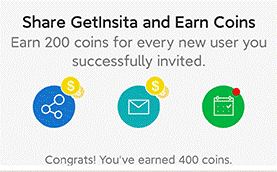
Third, share this app to get more coins.

Get Auto Likes
Back to IG Liker’s official website, we found the Instagram auto liker page where we can see the advantages of having more Instagram likes and Instagram auto liker. IG Liker claims that they can help you get likes not only for your already published posts but also for your scheduled posts.
We already know that IG Liker is a liking for liking platform, which means your posts will be automatically recommended to other users. Once other IG Liker users like your posts, you will get free auto likes.
Conclusion
We have given you a simple review of an Instagram growth tool called IG Liker, which can drive you free Instagram followers and likes from 100% real accounts. Try this app today and grow your Instagram account with more organic followers and likes.
How Can You Make Your Office Presentations Clear and More Engaging?
Minishortner.com What Is Site Map for SEO? A Detailed Explanation for Website Owners
8 Common Mistakes Businesses Make When Adopting SaaS
7 Tips for Developing Apps for Foldable Smartphones
Types of Deep Learning Networks
All You Need to Know About Digital Marketing
5 Gadgets You Need For An Outdoor Trip
Time to Claim Free 30-Days Trial of Discord Nitro
Which Business Model Is Most Common for Insurance Companies?
How to Take Screenshot on iPhone 11?
Trending
-
Tech2 years agoThe Evolution of Mobile Technology: Past, Present, and Future
-
Gaming3 months agoIs the Forest Cross Platform or Not – Find Out All You Need to Know!!
-
Business3 years agoIs It Beneficial To Learn Business Analytics In 2023?
-
Gaming2 months agoIs Europa Universalis 4 Cross Platform Multiplayer?