Connect with us

Mobile

Vivo Company Belongs to Which Country? Vivo Made in Which Country? Is Vivo Chinese Company?

Published

on

Vivo Made in Which Country

You must have come across the popular brand of mobile phones, smartphone accessories, and software named Vivo. Well, of course, because the brand has taken over the technology market popularly in the past few years.

It would not be incorrect to say that you are also familiar with the fact that Vivo Communication Technology Co. Ltd is a Chinese technology company which is based in Dongguan, Guangdong.

But still, the question arises like Vivo made in which country? Is Vivo Chinese company? And all such things.

As a buyer, there are so many confusions and questions that can come to your mind. Hence, here in this article, we have decided to disclose all those.

Vivo is a Chinese company that creates software for its phones which is sold through the V-App Store. It is a self-contained company that creates its own products and has more than 10 thousand people working under it in Shenzhen, Guangdong, and Nanjing.

The brand has shown interest in India’s diversity by partnering with popular shows like Comedy Nights with Kapil, MTV Roadies, MTV Bollyland, and more.

Besides that, it has partnerships with other shows like Koffee with DD, Extra Jabardast, Majha Talkies, etc. The brand’s major focus and the motive remained in reaching out to everyone in India and looks forward to forming more partnerships.

Vivo is Chinese company that aligns well with the Made in India Initiative and has created the company’s first assembly plant in Greater Noida.

This would create enormous employment opportunities which would support Vivo’s success in a long term goal.

It would not be wrong to say that Vivo is a Chinese company that has taken the international route already.

It has been accepted in many countries like India, Malaysia, Thailand, Vietnam, Indonesia, and more. It made its first debut in 2014 in India.

Within a few months, the company managed to establish itself as hi-fi and a smart brand. Thus, it has managed to serve Indian customers in more than 300 cities and all of the states of India.

Vivo is made in which Country? Where does it come from? 

The question always arises among the buyers like Vivo is made in which country? Is Vivo a Chinese company?  

This has created chaos among the buyers and there’s no accurate answer found. However, there’s no need to wonder anymore.

This article will help you to understand everything in detail. Also, it will clear your questions “Vivo is made in which country? Is Vivo a Chinese company? And so on.

Basically, to inform you again, Vivo is a Chinese company, based in Dongguan, China. It is also a parent company of BBK electronics which is known to be a Smartphone manufacturer where other brands like Oppo, Realme, and OnePlus are a part of it.

On the other hand, BBK Electronics is a Chinese technology company that is owned privately.

However, Vivo is the major Smartphone brand among them that provides affordable high-tech Smartphone devices.

This brand Vivo is a Chinese company and comes with a wide range of Android devices including Vivo X50 pro, Vivo Z1 Pro, and more.

If you have read until here, then guess you have discovered the answers to your questions “Vivo made in which country? Is Vivo a Chinese company?

Is Vivo made in China? Is it Chinese Company? 

Yes, Vivo is a Chinese company, indeed and has become successful even in countries outside China. It is based in Dongguan, Guangdong which is in China.

However, unlike other brands, it does not have to do much with China as the sales have proceeded from India itself.

Not to mention, the company has hired mostly Indian engineers to carry out their operations and also owns a manufacturing unit in India.

The History behind the Smartphone brand Vivo!!

Guess you already know about Vivo made in which country? Or is Vivo a Chinese company? But to make things easier for you it is better to turn the pages backwards and understand its history.

Vivo was founded back in 2009 and was selling its phone in China only. Later, the brand decided to extend its reach in a few more countries.

Basically, Vivo is among the top 10 Smartphone brands with a global market share of 2.7 per cent. Moreover, it has gained immense popularity and growth internationally after 2014.

The brand started selling its smart phones in places as stated down below.

  • Russia
  • Myanmar
  • Philippines
  • Thailand
  • Macau
  • Cambodia
  • Bangladesh
  • Laos
  • Hong Kong and more.

In 2020, it started selling its products in Europe as well. Vivo and Zeiss also announced a long term strategic partnership to promote breakthrough innovation in mobile imaging technology.

On the other hand, Vivo is a technology company that makes great products with a design-driven value.

Here one more thing is important to mention and that is the affordability it offers. Most of their devices are easily affordable by ordinary people and that is how they’re able to cater for the needs of the masses through their user-friendly and trustworthy products.

Their main focus is on smart devices and intelligent services. They made their first smartphone with a truly bezel-less display and elevating from front camera and in-display fingerprint scanning technology.

Also, the thinnest hi-fi embedded smartphone in the world is one of their prime inventions that has made their first footprints in the world of innovation.

Vivo has five manufacturing hubs including China (Dongguan), India, Bangladesh, Indonesia and China (Chongqing).

Apart from making smartphones, it also sells audio devices like Vivo TWS Neo earbuds, Vivo Watch, and more.

Therefore, they are looking forward to expanding their collection into areas like fitness trackers, tablets and over-ear headphones so that the world can enjoy exceptional innovations with their amazing products.

Do Vivo, Realme, OnePlus and Oppo belong to the same company?

Yes, and No, both the answers are considered in this matter. Vivo, OnePlus, Realme and Oppo, share resources with BBK electronics which is China’s largest consumer electronics manufacturer. But just, for this reason, we cannot consider them as the same company.

BBK Electronics was established back in 1998 and has been active in many electronic industries of China.

It was founded by Duan Yongping who made billions from a gaming console called Subor after which he founded Bubugao (now known as BBK).

BBK electronics developed and designed MP3, DVD, CD players besides other household materials and launched them into the world market successfully.

Is Vivo manufactured in India? 

By this time, you already know the answer to these questions like “Vivo made in which country,” and “Is Vivo a Chinese company”? 

But the truth is, it is also manufactured and assembled in India. The focus was to align the brand with the “Make in India” initiative besides creating employment opportunities as well.

It soon became a popular Smartphone brand in India with a focus on camera and music. The manufacturing location was chosen in Greater Noida that soon became the hub of offline and online supply of its products all over India.

Are Vivo Smart phones good for use?
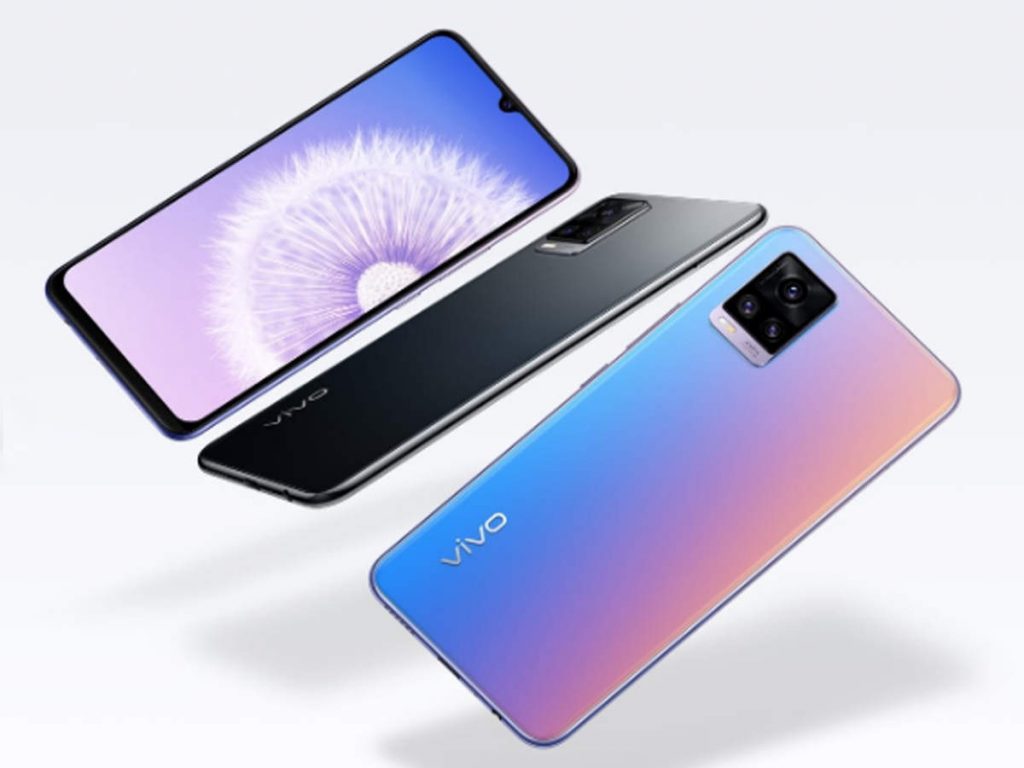
Vivo Smart phone

Guess you are planning to purchase a Vivo Smartphone. Because if you are, it is your main prerogative to know if the phone would be worth it or not.

Well, Vivo phones are extremely worth it and BBK is now bigger than Apple and Huawei. The brand makes and sells a lot of phones which is proof of their outstanding success.

Vivo was also quick to adopt the 5G technology and is known for its great cameras. It is guaranteed that no matter which phone you buy, the Vivo camera quality is superior to any.

The users never have to worry about storage when it comes to Vivo phones as most of them come with 128 GB internal storage. These phones come with great features and there is always something excellent to check out for.

Other than that, they also come with in-screen fingerprint sensors. The sleek design and the high-definition display quality is also unmatchable.

Apart from this, the major reason behind people choosing Vivo over any other is the cheap price.

Even the 5g models are available at reasonable rates for people coming from different backgrounds, sharing diverse mindsets.

The brand has phones available that fit any budget and offers huge selection options to the customers.

So if you are a techie, then purchasing a Vivo Smartphone is definitely going to be a great choice for you.

Thus, some of the best-selling Vivo phones include Vivo V20 SE, Vivo V20, Vivo V20 Pro, Vivo Y20 and Vivo X50 Pro 5g which are still running successfully.

Who owns the Vivo Smartphone Company? 

The Vivo Company is owned by BBK electronics which is the world’s largest manufacturer of smart phones. It is known to have a 19 per cent market share in 2020.

Other than that, Vivo, Realme and Oppo are considered to come under the same manufacturer and the brand sold nearly 260.7 million units that gave tough competition to brands like Samsung.

However, the relationship between BBK electronics and these brands are still unclear as BBK electronics always tends to stay lowkey.

Who are the CEO and Brand Ambassador of Vivo? 

The CEO, founder and president of Vivo is Shen Wei. He founded the brand back in 2011. As per sources, Jerome Chen is the CEO of Vivo India.

Nevertheless, the products are made in India but the revenue and profits go to the hometown of the brand which is China.

While the brand Ambassador of this company is Virat Kohli who is an Indian cricketer. He joined the company in the month of April and has been seen in advertisements promoting its launch.

All “Above the line” (ALT) and ” Below the line” (BLT) activities including brands upcoming TV campaigns, social media, print, outdoor will be included in the partnership.

Furthermore, in an interview, the director of the brand strategy of Vivo India named Nipun Marya said, “Vivo’s major focus remained on watering the needs and preferences of the customers so that joy can be welcomed in their lives“.

Nipun further added by saying “it is fantastic to work with someone like Virat Kohli who knows a better way to connect with the audiences. 

On the other hand, Vivo is looking forward to expanding the brand via popular personalities like Sara Ali Khan and Aamir khan. 

But the brand is also confident that sports figures will equally help in doing so“.

Where is the Manufacturing plant of Vivo India, Based? 

As mentioned earlier, Vivo is a Chinese company but has also established a manufacturing plant in India.

It is located in Greater Noida which was a Rs. 7500 crore investment in India. This facility is expected to produce about 8 million devices every year.

Whereas the current facility of this manufacturing plant is 24.9 million per unit annually and has given employment opportunities to more than 7800 people.

Besides this, the expansion plan of BBK Electronics which owns One plus has planned to hire more than 4500 people.

Therefore, according to the experts, this can lead to increasing exports in the coming years of India’s capacity expansion plan.

What is Vivo’s Net Worth?

Within a few years after entering the Indian Market, the Brand Vivo has experienced a phenomenal rise of more than 75 per cent.

Its losses have also decreased as the overall revenue has seemed to double.

The net worth of Vivo is estimated to be more than $9.75 million, however, the exact amount is still not being able to be calculated.

This net worth is calculated depending on the YouTube ad revenue only. However, it would be good to expect a net worth higher than $9.75 million.

Besides that, some sources also reported that Vivo India’s net worth can be estimated as high as $13.65 million.

According to the experts, the company’s main focus is to invest for the long term, which may take years.

But the company will surely show improvements and will positively impact holding a strong position in India.

It is also expected to see the brand sitting next to Samsung and Apple.

Wrapping it up 

Vivo is a Chinese company based in Dongguan, China that manufactures and assembles mobile phones in India as well. 

The phones are of great quality and are majorly popular for their excellent camera. 

Besides that, the net worth is estimated to be more than $9.75 million and the Brand Ambassador of the company is Indian Cricketer Virat Kohli

So if you plan to purchase a Vivo smartphone, then it is surely going to be a wise decision.

Mobile

7 Tips for Developing Apps for Foldable Smartphones

Published

on

Mobile app development

There was a time when owning a smartphone was associated with luxury. Only rich ones could afford them.

But at the start of the 21st century, the smartphone market exploded with dozens of new brands, not only making the price range affordable but also introducing some exciting new features.

Foldable smartphones instantly grabbed the attention of people. Foldability was a unique feature, people could treat their phone like a brochure or leaflet while reading something on it.

And despite the constantly evolving technology and new trends, foldable devices are still here. Samsung, most notably, produces such phones that people still enjoy using and holding in their hands.

If you’re a mobile app developer, you’ve got to think differently when creating an application for foldable devices. Here are some of the factors and alterations to consider in this regard:

1.Create a Resizable App

Since you’re developing an app for foldable smartphones, you must consider the size of such phones. Their screens are significantly larger than traditional phones. Also, these phones are equipped with multi-window mode.

So it’s your responsibility to design an app that’s compatible with both sizes of a screen as well as the multi-window mode. Do some research and find out a simple line of code to make your app resizable according to the mode in which it’s opened.

2.Consider the Two States of the Phone

It’s important to account for the two states of the phone. They both are different from each other. A simple phone will not have a folding feature while the foldable one will work differently.

The foldable phones can be used with both folded and unfolded screens. While designing the functionalities of your app, consider the foldability feature of an app.

Normally, foldable screens have a lot of space on the screen compared to unfoldable ones; the latter is quite rigid. A user has more freedom and space to work with when he’s on a foldable screen.

Be creative and think out of the box. Introduce features that will give the foldable smartphone users a feeling of pride.

3.Make Your App Capable of Handling Multi-Window Mode

A multi-window mode is a mode in which two apps run simultaneously on the same screen. This is only possible on foldable screens — and this is what makes them different from the traditional screen.

But there’s one aspect you need to take care of while designing your app — make it capable of handling multiple apps at the same time. Consider the space your app will occupy, the multi-tasking capabilities of a device, and changes in the app accordingly.

4.Screen Continuity

As said before, there are two states of such phones — folded and unfolded. As a developer, it’s your job to make this experience a seamless one for the end-user. Minimize the number of interface layout shifts to prevent any interruption in the user experience.

5.Adjust Screen Ratio

Foldable devices have different screen ratios, that’s because some have short and bulkier screens while some have long and thin screens. It’s the developer’s responsibility to design an app that fits both types; the app must adjust itself on all foldable screens.

To do it, implement minAspectRatio and maxAspectRatio and find out if the screen is compatible with the device or not.

6.Ensure 100% Quality

Most importantly, you should ensure that your app caters to all smartphones, not just the foldable ones. As we have multiple smartphone brands all across the world, they keep coming up with their own types of smartphones.

It’s the mobile app development company’s responsibility to make sure that the functionality of the app remains optimum, irrespective of the fact the device it is operated on.

Therefore, it’s recommended to plan before you implement. Figure out how many devices your app is supposed to support. Do your research about the screen ratio and resolutions of different foldable phones.

There’s not much you can do about the future technology, but you can take the oldest ones into account before developing your next app.

During the development phase and after completion of a project, run your app on different foldable screens and analyse its performance. You will learn where you need to improve to make your app perfect for all screens and devices.

7.Take Feedback & Improve

Rarely will you reach the most perfect version of your app in the first attempt. You have to keep iterating to meet the increasing requirements of the users. With every new phone launch, developers bump into new challenges.

So the only way to create viral apps is to take feedback seriously and improve your app. The same goes for the apps designed for foldable screens. Keep an eye on the market trends, note specifications of the latest specifications, and reviews on the Play store, so you know how to improve your app further.

Final Thoughts

Mobile app development is a skill that requires both technical expertise and knowledge, as well as creativity. And when it comes to foldable smartphones, you have to be careful because of the varying screen sizes and the user requirements.

A foldable phone user is likely to use multiple apps at the same time, so your app must be optimized for speed. Likewise, it should render a seamless transition experience for different screen modes.

While designing your next mobile app, keep these tips in mind to cater to the needs of all users.

Continue Reading

Mobile

How to Take Screenshot on iPhone 11?

Published

on

By

How to Take Screenshot on iPhone 11?

Are you looking for ways on how to take screenshot on iPhone 11? Nowadays, one of the most important things on the internet is screenshots, because they never used to be this powerful earlier, but immense increment in mobile working made them so! And today we are here to find out various ways on how do you take a screenshot on iPhone 11.

Hopefully, you are a regular iPhone 11 user and eager to know the entire procedure. So, stay tuned till the end as we talk about the whole thing with step-by-step explanations.

No matter what, the iPhone 11 remains a powerful smartphone. Be it camera, screen, or battery life, everything is top-notch. Even though the way of the screenshot is unique now, it is not impossible.

Also Read: How to Take Screenshot in Samsung M31

As many people routinely take screenshots, not everyone knows how exactly to capture a screenshot as every phone has its own functions. So here are some ways on how to screenshot on iPhone 11. 

A Step-by-Step Guide on How to take Screenshot on iPhone 11 

Since the iPhone 11 lacks a home button, you must be thinking, taking screenshots is a difficult task. Aren’t you?

As many people don’t know about many functions of a phone, they seek help from google by searching how do you take a screenshot on iPhone 11? If you’re also among those, know that taking screenshots on iPhone 11 is easy and the steps are as follows :

Step 1- Press the side button and volume up button 

Also known as the sleep/wake button, you can take screenshots on iPhone 11 by simultaneously pressing the volume up and the side button.

The moment you release your fingers and let go of the buttons, you’ll be notified as a screenshot captured on your screen.

Step 2- Edit Screenshot 

Once you capture the screenshot, you’ll be notified and also hear a camera shutter sound. Once you see a screenshot preview on your screen, now you can simply edit.

To edit, tap on it and see the options to edit the screenshot. Besides, you can also crop the screenshot according to your choice.

Step 3- Share Screenshot 

Now that you know how to screenshot on iPhone 11, you may also want to share what you’ve saved. To share the screenshot you captured, you can either tap and hold on to the preview to directly send the screenshot to any friend or any app, or else you can go to your screenshot album in the Photos app and select the screenshot and share it.

Therefore, even if you dismiss the screenshot preview, know that it will be automatically saved in your gallery or in the Photos app. For instance, if you want to share something through Whatsapp, you’ll have to choose a contact to share the screenshot and then tap next.

How to Take Screenshot on iPhone 11 Using Assistive Touch

Are you looking for ways on how to take screenshot on iPhone 11 by using one hand? Know that it is possible with the assistive touch and here are the steps :

Step 1- Enable Assistive touch 

Go to Settings>General>Accessibility> Assistive Touch and then enable the Assistive touch option. For those who don’t know what an assistive touch is, then know it is a semi-transparent button added to your screen.

Step 2- Customize top-level menu 

Click on the “Customize top-level menu” option, then tap the custom icon and you’ll see a list from which to select the screenshot button. By doing this, the screenshot button will be added to the Assistive touch menu.

Step 3- Take a screenshot using Assistive touch 

Once you’ve added the screenshot button on the assistive touch menu, you can simply take a screenshot using one hand. All you need to do is tap on the assistive touch button and then the screenshot button.

So by using this method you can stop your search on how to take screenshot on iPhone 11?

Where to view screenshots on iPhone 11?

Are you done taking screenshots? Besides looking for ways on how to take screenshot on iPhone 11, you must probably be looking for the screenshot you’ve captured. To view all your screenshots in one place, go to your screenshot album inside the photos app.

Just like any album in the gallery, the screenshots you take are also automatically added to the album.

Now that you know about how to screenshot on iPhone 11, the next thing is to go through what you’ve saved. So all you need to do is go to the Photos app, from there tap the albums tab and visit the screenshot section and you’ll find everything you’ve captured in one place.

Now, let’s figure out “How do you take a full screenshot on iPhone 11”

Once you’ve taken a screenshot on your iPhone 11, by using any of the above methods, another feature iPhone 11 allows is to take a full screenshot.

All you need to do is tap the preview in the bottom left corner before it disappears then simply choose the full page option in the top right corner.

Why won’t my iPhone 11 Take a Screenshot?

Many times taking a screenshot doesn’t work well. In such cases, the option here is to force reboot your iPhone. All you need to do is hold the power button for at least 10 seconds and then restart your phone.

Some facts you must know while taking screenshots on iPhone 11

Besides, looking for ways to figure out How do you take a screenshot on an iPhone 11, there are some other facts that every iPhone 11 user must know- Check them Out yourself.

  • Aside from cropping the screenshot, you can also mark the screenshot you’ve captured by using any pen or pencil from the tools displayed at the bottom of the screen.
  • After taking a screenshot on your iPhone 11, know that you can add text, signature, or even highlight boxes. This can be done with the help of additional edit options, which you can find in the bottom left corner as a plus button.
  • The Assistive touch button feature allows iPhone 11 users to capture a screenshot with a single touch of a digital button.
  • iPhone 11 screenshot feature allows its users to immediately view and edit the taken images.

It helps after all!!!

No doubt, the iPhone 11 is capable of performing many things, and taking awesome screenshots is one of them. Be it sharing screen images with friends on social media or saving a funny meme, screenshots are extremely helpful for every situation. 

Continue Reading

Mobile

How to Take Screenshot in Samsung M31

Published

on

By

How to Take Screenshot in Samsung M31

Are you looking for directions on how to take a screenshot in Samsung m31? Be it sharing a bunch of secret messages to your best friend or capturing any moment on the screen, screenshots are the most appropriate functions on a phone.

As there are many ways of taking screenshots on a phone, yet some people are unaware of the correct instructions. So here are some simple and easy methods of taking screenshots on the Samsung Galaxy M31.

How to Take Screenshot in Samsung M31

Take screenshots using the key combination 

If you’re thinking it is very difficult to learn how to take a screenshot on Samsung m31, then know that it involves some easiest steps even for beginners to learn easily.

All you need to do is use buttons on the side. Here are some instructions on this method for your better understanding:

  • Step 1- Go to the website or on the page of your social media which you want to capture. Before taking the screenshot, make sure you set up your screen.
  • Step 2- Don’t worry if your screen briefly flashes and shrinks because this is how the screenshots are being saved on your device.

So here you need to press and release the volume down button and power button simultaneously.

  • Step 3- What if you don’t have to press the buttons of your device simultaneously, yet take more screenshots of the screen you’ve chosen. Isn’t this amazing?

Once you take your first screenshot, you’ll notice a screenshot tool strip will appear for a few seconds at the bottom of the screen. Just right below the screenshot tool, look for the term ‘scroll capture.

This tool is helpful for taking a scrolling screenshot without pressing the buttons again and again. The screenshots will be saved automatically just by tapping the scroll capture.

Therefore, taking a screenshot with the Samsung galaxy m31 using the hardware key combination is the most used and easy way.

Taking screenshots using the palm swipe features 

Another easy method of how to take a screenshot in the Samsung m31 is by using the swipe features. If you don’t want to use the button for taking screenshots, then all you need to do is some simple settings.

No doubt, Samsung Galaxy M31 has a lot to offer to its users. One such function it offers for capturing screenshots on Samsung Galaxy M31 is through palm swiping.

This gesture is enabled by default. However, here are some steps for your better understanding :

  • Step 1- Go to your settings on the Samsung Galaxy M31 and then tap Advanced features.
  • Step 2- From Advanced features, you need to go to Motions and Gestures for taking screenshots on Samsung galaxy m31.
  • Step 3- Now, turn on the switch to the right to enable Palm swipe to capture function on your device.
  • Step 4- Once switched on, you can go back to the screen you wish to take a screenshot and simply snap a screenshot of that page by placing the edge of your palm on the screen’s edge.
  • Step 5- One can place their palm either left to right or right to left, as both directions are allowed. Once you’re done, you’ll get an indication with a brief flash and shrink, knowing that your screenshot has been taken.

Taking screenshots using the voice method

Are you looking for ways on how to take a screenshot in Samsung m31 by using voice? Have you heard of Google Assistant? Being an Android user you must have definitely heard about this feature.

But still, there are some people who are unaware of many functions on their own phones. So if you’re also among those who don’t know that it is possible to take screenshots on Samsung galaxy m31 using your voice, then here are some simple steps :

  • Step 1- Firstly you need to enable the Google Assistant feature on your Samsung Galaxy M31.
  • Step 2- Then go to the screen of any page or website you want to take the screenshot of.
  • Step 3- Now simply command something with a clear voice. For instance, “Okay, Google take a screenshot”. This will automatically screenshot any page available on the screen.

Besides, you can also command Google Assistant to take screenshots and post it on social media platforms like Facebook or Twitter.

Taking screenshots using the “assistive touch” menu

Another useful way you must know how to take a screenshot in Samsung m31 is by using the assistive touch menu. This is a floating icon on the screen that comes with a variety of options.

To take a screenshot using this method, you need to follow some instructions such as :

  • Step 1- Go to your Samsung Galaxy M31 settings and then click on accessibility.
  • Step 2- From here go to interaction and dexterity and switch on the assistive menu.
  • Step 3- By doing this, you’ll see an assistive menu on your screen.
  • Step 4- Now simply go to any page you want to take a screenshot of and then select the assistive menu icon from the drop-down menu.
  • Step 5- Now choose the screenshot option, capture the screen and your screenshot will be saved on your device.

Taking screenshots using the application 

In some cases, most people prefer applications over the functions which a device has to offer. So if you’re too looking for an application that can be useful as how to take a screenshot in Samsung m31 then here are some simple steps involved :

  • Step 1- Go to your Google play store and search for apps that allow you to take screenshots on devices. Then, choose the one you prefer and also make sure to go through the functions it offers.
  • Step 2- Once installed, open the app and access permission.
  • Step 3- Now go to the screen which you’ve chosen for capturing and start taking screenshots.

Choose your method… 

However, whether you want to take, save or share, screenshots are always helpful and have become one of the most important things on the internet these days. Therefore, you can choose any of these above-mentioned methods of taking screenshots on Samsung galaxy m31 according to whichever feels most natural and convenient to you.

Continue Reading

Trending